
How do I download a digital pass for a Junior member
Junior members aged 13 and under can use the same email address as their parent or guardian account. As long as the email address matches and the account is set to “manage tickets” within the network section, the parent or guardian will be able to download the Junior’s pass.
Junior Gunner members aged 13 and under also have a username that can be used to log in and download the digital pass.
Junior members aged 14 and over should have their own email address linked to their account and will therefore need to log in using their own account to download the digital pass.
How do I locate a Junior Gunner username
If you are a Junior Gunner aged 13 and under , then you have a username.
Please click here to access the online box office and login under the parent/guardian account, then select the head-and-shoulders icon in the corner to log in.

Click on account menu

Click on Personal details

Scroll down on the personal details page to view the JG username

What is Near Field Communication (NFC)?
What if my phone dies at the stadium?
- Take your phone to the South West Collections office (between turnstiles A and S) and you can access phone charging facilities here
- Go to the box office next to the Armoury store with your photo ID where they can print you a physical ticket
Can I get a PDF ticket?
Can I forward a Digital Pass?
Do I need WiFi/signal for my digital pass?
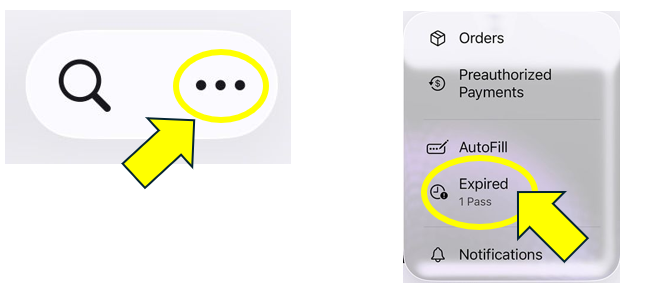
My pass has disappeared from Apple Wallet
• Open your Apple Wallet App
• Click on the 3 dots in the corner and select Expired
• Select your Season Ticket and tap 'Unhide'
• Return to the main Wallet screen
Which Apple devices support the Arsenal Digital Pass?
- All Face ID enabled phones
- All touch ID phones except 5s
- The original Apple watch and later
If you have recently updated your Apple iPhone to the latest iOS software and your pass does not show in your wallet please retrieve this from ‘View Expired Passes’ in the first instance.
My Android Digital Pass shows a barcode
How do I know if my Android device supports NFC?
1. Make sure your default payment method on your phone is Google Pay. You can check this in the settings on your phone
2. Make sure NFC is enabled on your phone. You can do this in Google Pay, or alternatively in the settings on your phone.