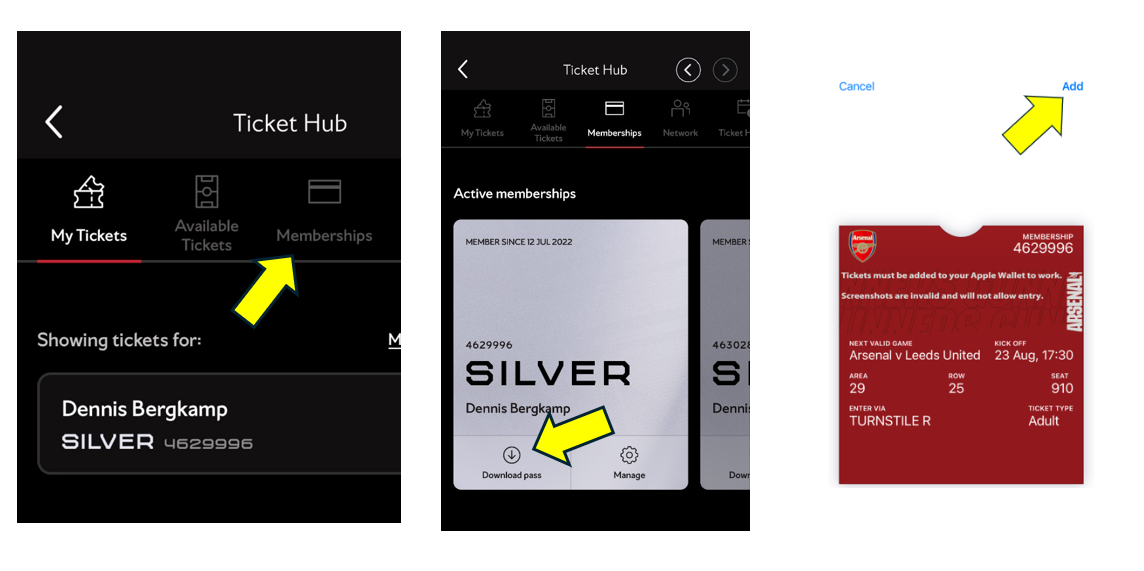
How do I gain access to the stadium?
Access to Emirates Stadium will be via digital pass only, and your physical membership card will no longer work. You only need to download your pass once, and any tickets for home matches you purchase will be automatically uploaded to it for fast and secure entry.
Tickets can be downloaded directly into your wallet on your smartphone via the App.
My iPhone Digital Pass hasn’t updated
Your Season Ticket pass should update automatically to the next available fixture. Make sure updates are enabled in Google Pay / Apple Wallet. If not, follow the steps below:
iPhone:
- Go to Apple Wallet → your season pass → circle with three dots → Pass Details
- Enable "Automatic Updates"
- Pull down to refresh/update the pass or toggle Automatic Updates off and on


Android: Automatic Updates should be on by default. If not, try restarting your phone or removing and re-adding the pass via the Arsenal App.
My Android Digital Pass hasn’t updated
If your digital pass hasn’t updated to show the next game, but is showing a previous game or no seat details, don’t worry! Click on "Show Code," and a barcode will appear. You can use that barcode to gain entry to the stadium.


You must be running version 9 or higher for Google Wallet. For info on checking and updating your software version, click here.
To use NFC tickets with Google Wallet on a Samsung device, set Google Wallet as the default payment app. Check under "Connections → NFC and contactless payments" in your device settings.
Most Android devices support NFC. If yours doesn’t, all Android digital passes have a barcode on the back that updates every 20 seconds. Screenshots won’t work for entry.
How to scan your Digital Pass
Before leaving home, make sure your phone is fully charged and your digital pass is downloaded in your wallet.
At the stadium, follow the instructions to gain entry. If there are issues, visit the Digital Ticketing Help Centre (Turnstile A) or the Matchday Box Office (next to the Armoury).
If having issues scanning, remove your phone case.
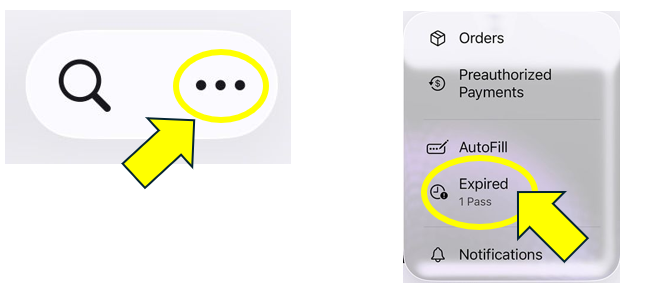
My pass has disappeared from Apple Wallet
• Open your Apple Wallet App
• Click on the 3 dots in the corner and select Expired
• Select your Season Ticket and tap 'Unhide'
• Return to the main Wallet screen
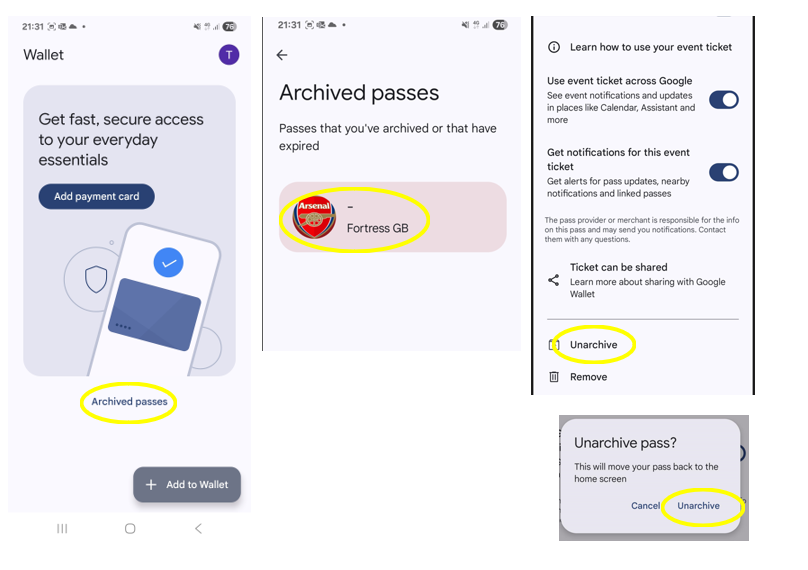
My pass has disappeared from Google Wallet
Please follow the steps below to unarchive your pass.