
I'm eligible for Window 1, but my friend is only eligible for Window 2 - can I go into Window 2?
If you qualify for Window 1 but someone in your group is in Window 2, and you want to purchase tickets together, it’s recommended that you wait for the later phase and register in the ballot together. It will not be possible to Unfortunately, UEFA cannot reallocate or transfer bookings between windows.
If Members register as a group, will each ballot entry either be successful or unsuccessful, or can a ballot entry be partially successful?
Members who register for the ballot as a group will be balloted together and the whole group will either be successful or unsuccessful. There will be no partial success whereby one Member of the group is successful while another is unsuccessful or vice versa.
If Members register with a group does this decrease their chances of success?
No - entering the ballot as a single application does not increase or decrease your chances of success compared to applying as part of a group.
All applications are treated equally within the ballot process, regardless of group size. Each entry has the same probability of being selected, so whether you apply individually or with others has no impact on your likelihood of success,
The best approach is simply to apply in the way that suits your plans.
If I submit a ballot entry with other supporters, will we be entered as a single group?
Please note that members who register as a group will be balloted as a single entry. This means the entire group will either be successful or unsuccessful together.
Can I modify or cancel a ballot entry once it has been submitted?
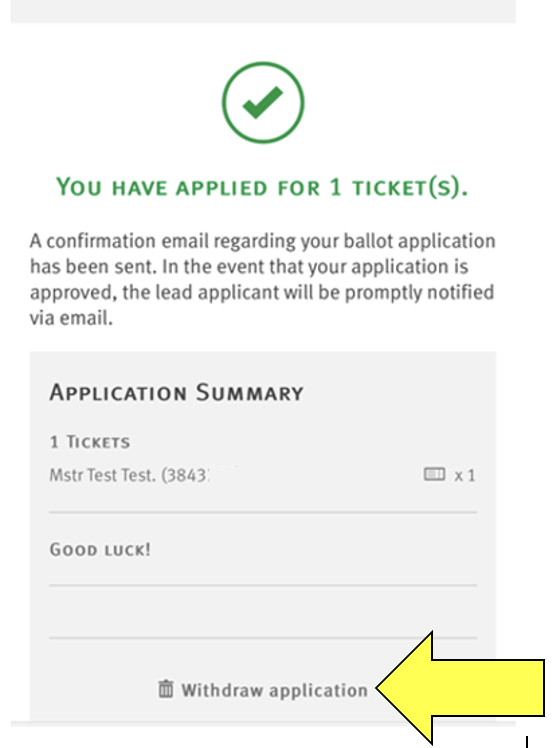
If you need to modify or cancel a ballot entry, e.g, remove or add a supporter then you will need to cancel the application and redo, and this can only be done whilst the ballot registration window is open.
Please see below how to do complete this online.
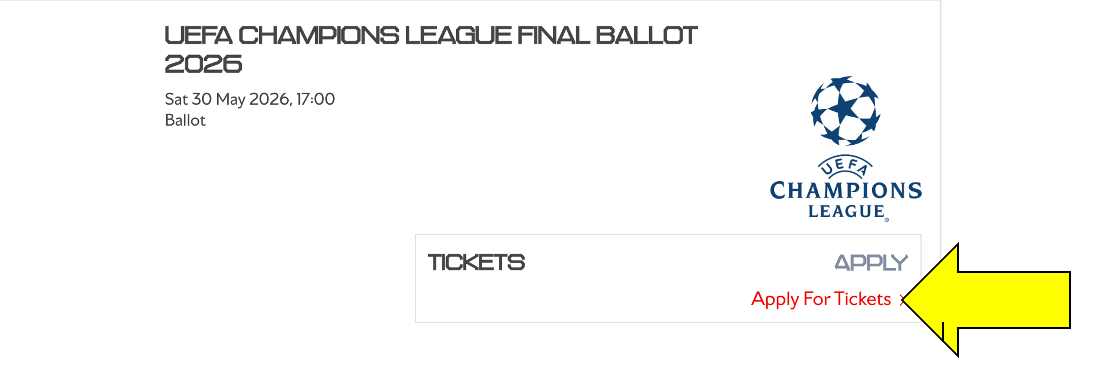
Go to Tickets & Ballot and select Ballot Registrations.

Find the relevant ballot for your membership and click Apply for Tickets. If you are not eligible, an error message will appear.
I applied for the ballot and I didn't receive a confirmation email
A confirmation email will be sent to the lead members email address only from noreply@boxoffice.arsenal.co.uk.
We recommend that you add noreply@boxoffice.arsenal.co.uk to your safe senders list through your email account settings.
You can also log back in to your ballot application, and you will receive a confirmation on the screen.
I have registered for the ballot, what happens next?
If your application is successful, the lead member will be sent a ballot confirmation. Following the confirmation, the lead member will also be contacted separately by email on Monday 11 May to confirm details of how to purchase the tickets via the UEFA ticketing portal, as per the ticket information page.
You will then be able to select available categories in the stadium during this sales phase. Successful entrants will be eligible to purchase from 1pm on Tuesday 12 May until 1pm on Thursday 14 May.
There will be one access code per successful season ticket holder.
My application is on standby, what does that mean?
If your application is "On Standby", the lead member will be contacted by email, and your application will remain within the system should uptake in the previous sales windows not fulfil the allocation, or any further allocation be received from UEFA.
Should this be the case, all those who are on standby will be given access codes and will have the opportunity to purchase on a first–come, first-served basis.
You will then be able to select available categories in the stadium during this sales phase. Standby window entrants will be eligible to purchase tickets should they become available from 1pm on Friday 15 May until 1pm on Monday 18 May.