
Gold members can purchase their own season ticket seat(s) for our FA Cup tie against Wigan from 1pm on Monday, January 19, which will be reserved online and held until 1pm Thursday, January 22. There will be no booking fee during this priority period for Gold members.
Gold member priority booking period
| ST Holder Priority Window Opens | ST Holder Priority Window Closes |
| 19/01/2026 at 1pm | 22/01/2026 at 1pm |
How do I pay for a reserved seat?
Please log into your Online Box Office account here.
Once logged in, please click on the head and shoulder icon in the top right hand corner of the page.

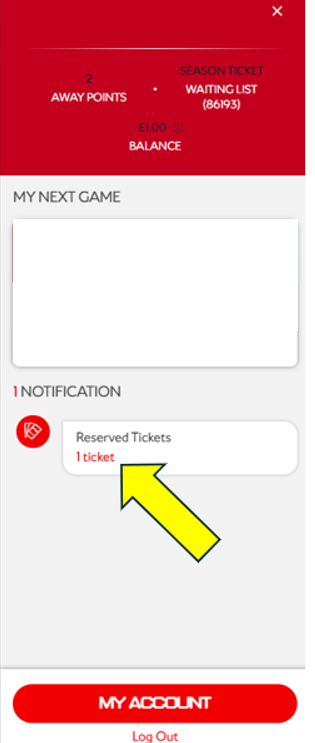
Under 'Notification' you will see your ticket under 'Reserved Tickets'
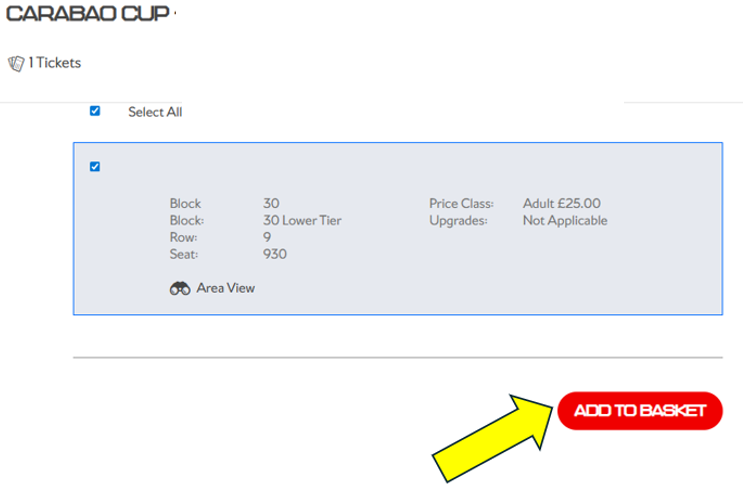
On the next page you will then be able to assign the correct price that is applicable to your membership type.
If you hold a concession season ticket, your seat has already been reserved to the correct concession. You will be able to amend this online when booking should you wish to upgrade to an adult ticket. Please note if you upgrade but wish to change back before making a purchase, you will need to log out and log back in to default your seat back to the original concession.
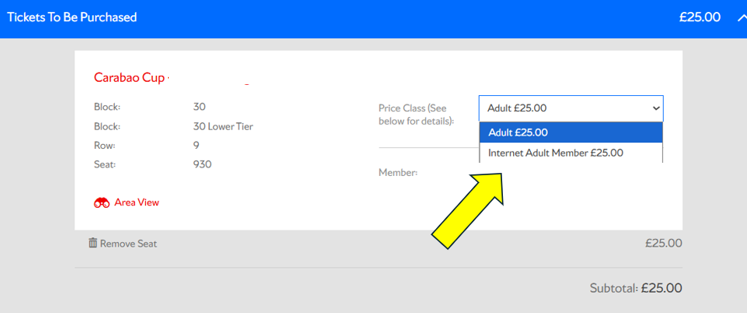
Once you have made your purchase, you will then receive a confirmation email. If you are unable to locate the email then the purchase will show in your booking history.
Any purchased tickets will automatically show on the digital pass approximately one week before the relevant fixture.
Season ticket holders can use the ticket transfer service from 5pm on Wednesday, January 28th.